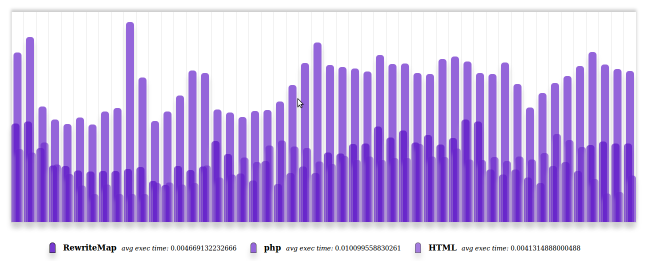
As every developer knows, a way to get a better performance is page-caching. This boost performance because fewer database queries has to be executed, but you can take caching a bit further. A plain html page is much faster loaded than one that is created by an interpreter like php, but it is not flexible at all. You can create a deployment script that creates cache files as html pages before anyone visits them or use some PHP accelerator like opcode to speedup the page load, but here is an alternative.
Using Apache mod_rewrite
The general idea to create a flexible fast caching method is simple: “Redirect any given url to the existing cached html or create the cache”. To make this happen you could use the RewriteMap functionality to create a hash for the request that matches the cache. This way you would not have to create many directories with index files. Because RewriteMap does not work properly in a .htaccess file, it should be placed in the virtual host definition.
        ServerName your_host
        DocumentRoot /path_to_your_host


                Options Indexes FollowSymLinks MultiViews
                AllowOverride All


        RewriteEngine On
        RewriteMap hash_url prg:/path_to_hash_file/md5.php

        RewriteCond %{REQUEST_FILENAME} !-f
        RewriteCond %{REQUEST_FILENAME} !-d
        RewriteCond $1 !^(/index\.php)
        RewriteRule (.*) /html/${hash_url:$1} [L]

        ErrorDocument 404 /index.php
In this example the request always will be rewritten to the cached filename that is placed in the html directory. When this file does not exists the ErrorDocument will reroute the request back to the index file. To get the hash that is used as the name for the file in cache you can create a php file (or perl if you prefer), like this:
#!/usr/bin/php -q
set_time_limit(0);
while (true) {
        $line = trim(fgets(STDIN));
        print md5($line) . ".html\n";
}
This file will loop forever, catching the input for each request that will be rewritten by RewriteMap by using the standard input variable: STDIN. Don not forget to set the time limit and create a infinitive loop, because this script should never stop! Furthermore use the KISS principle when creating your own rewriteMap program.
Index.php as ErrorDocument
In the index file you can create the page content (as you normally do working with rewrite rules) and save it using the same hash-method your RewriteMap script expects.
// quick-fix for missing $_GET variables
if (empty($_GET) && isset($_SERVER["REDIRECT_QUERY_STRING"])) {
    parse_str($_SERVER["REDIRECT_QUERY_STRING"], $_GET);
}

/*
do your normal stuff
..
untill you have your output ready
*/

// when the file can be cached
if (true === $createCache) {
    $cache = 'html/' . md5(parse_url($_SERVER["REQUEST_URI"], PHP_URL_PATH)) . '.html';
    file_put_contents($cache, $generatedHtml);
}
// show the page
echo $generatedHtml;
In my test-case that was the source for this article I did not have any $_GET variables when the file was not cached. I had no interest in analyzing that problem (I might come up later with a nicer solution).
Cleanup cache
It is important to cleanup your cached files that are unused or have not the latest content. When you moderate a page in your site-management you should delete the corresponding cache-file. (remember that the pathname of the url starts with a slash /). You also should create a cronjob to help you to cleanup your cache. In my test-case I did use the following code to cleanup cache older than 1 hour.
# !/bin/sh
PATH=`dirname $0`
cd $PATH/html
DATE=`/bin/date -d '-1 hour'`;
/usr/bin/find ./*.html -not -newerct "$DATE" -delete
Conclusive
Because Apache will cache the output generated by RewriteMap the results exceeded expectations. I figured the average time to get the page would be right in the middle between plain html and php file_get_contents, but as shown in the figure below the results were much better.